


Sparkle TV Player
3.6132.00 Reviews
App Specs
- Version
- 2.3.1
- Updated On
- License
- Free
- Downloads
- 100,000+
- Developer
- HKAB
- Categories
- Video Players & Editors
- Platform
- Android
Screenshots

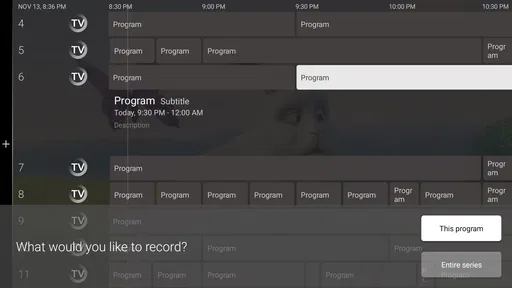
 Analysis by AppCompare
I find an IPTV player most useful when I already have a legitimate service and want a comfortable way to watch it on a television, rather than when I’m looking for a subscription or a library of shows. That distinction matters with Sparkle TV - IPTV Player: it’s a video-player app from HKAB, designed to work with an IPTV provider on Android TV, Google TV, or Fire TV. It does not replace the provider or supply channels by itself, so the first decision is whether you already have a service and the playlist or login details it requires.
Start with your setup, not the channel list
Before installing any IPTV player, I’d check where I intend to watch and what access my provider gives me. Sparkle TV is aimed at a television-based setup, so it makes the most sense if the screen in your living room is running one of its supported TV platforms. Someone who mainly watches on an iPhone or iPad should not assume this is the right choice: the confirmed device focus is Android TV, Google TV, and Fire TV.
I’d also ask the provider how its channels are organized and what setup details it supplies. That small check can save a frustrating evening: a player can only work with access that the provider has made available, and a confusing playlist is not automatically fixed by changing apps. If you have several playlists, think about which ones you actually use before adding everything. A tidy starting setup is easier to browse and makes it simpler to tell whether any trouble comes from the player or the service.
The app is free to install, is rated for Everyone, and has optional in-app purchases ranging from $1.49 to $19.99 per item. I’d treat those purchases as a reason to review the choices inside the app before spending, rather than assume every useful feature is included or that a purchase is necessary. The current version is 2.3.0, and it requires Android 6.0 or later. Those details make it easier to judge compatibility and cost before committing time to setup.
How it fits a real TV routine
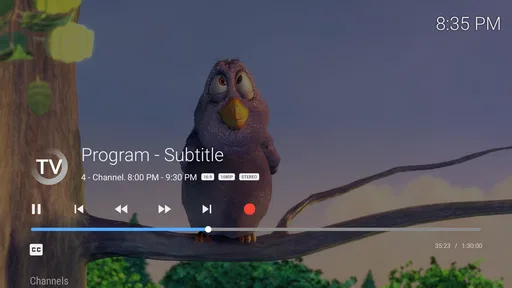
A realistic use case is settling in after work, opening the television, and moving from a live news channel to a game or a show without juggling a separate app for every source. When the provider’s playlist is already set up, keeping live channels in a dedicated player can feel more direct than casting from a phone or searching through a collection of unrelated streaming services. For me, that convenience depends on the provider’s lineup and stream quality as much as on the player itself.
There’s a useful distinction between an IPTV player and a conventional streaming app. Services such as subscription video platforms usually bring their own catalog, account, and browsing experience. A player like this is a viewing interface for a provider you choose; it doesn’t create a channel package. If you want one ready-made subscription with shows selected and managed in one place, a conventional streaming service may be a better fit. If you already use an IPTV provider and want its live channels on a TV, a dedicated player is the more relevant category.
Compared with watching through a provider’s own app, the main reason to try a separate player is having a distinct place to organize and watch IPTV. The trade-off is that you now have another app to configure and maintain. If the provider’s app already works well on your television, switching may not improve anything important. I’d compare the actual day-to-day experience—how quickly I can find a channel, whether the picture remains stable, and whether the guide is useful—rather than choosing on the promise of a longer feature list.
Worth Reading Before You Choose

Flipboard Shows What News Apps Must Do Beyond the Feed

Switching to Android Auto Means Rethinking Your Driving Routine

Google Calendar Makes a Crowded Week Easier to Manage

Ludo King Makes the Most of the Minutes Between Plans

Baby Panda World Brings Quick Play to Modern Phones, but Its Game Library Feels Busy

ESPN’s Live Game View Makes Following Close Games Easier
Make the guide and playlists work for you
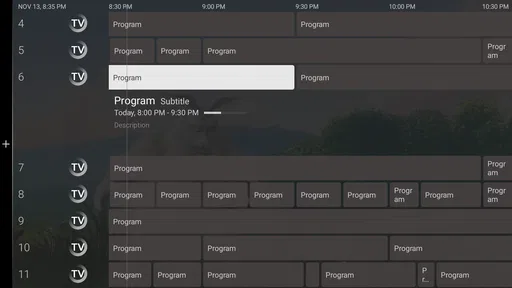
Electronic Program Guide support can turn a long channel list into a more practical viewing tool, but a guide is only as helpful as the schedule information available through your setup. If listings appear incomplete or do not match what is airing, I would first check the provider’s guide information and configuration rather than assume the player can fill in missing details. This is a useful troubleshooting habit: separate channel delivery from guide data before changing multiple settings at once.
For a household with different viewing habits, multiple playlists can also help keep sources distinct instead of merging everything into one sprawling list. I’d name or arrange them according to how I actually use them—perhaps one for everyday viewing and another for a specific provider or occasion—if the available organization controls allow it. The point is not to collect every possible channel, but to make the few I return to easy to locate. A smaller, purposeful setup can be quicker to navigate than a complete but cluttered one.
One practical tip is to test the channels you watch most before settling on the app as your main TV routine. Try a news channel, a longer program, and a channel you typically watch at a busy time of day. That gives you a better sense of whether the experience is dependable for your needs than sampling a single stream for a minute. If playback pauses, note whether it affects one channel or several; that distinction can help you decide whether to contact your provider or investigate the app setup.
Where the convenience has limits
IPTV playback relies on a working provider connection, so an app cannot guarantee that every channel will load smoothly. Network congestion, a provider-side issue, or incomplete account details can all get in the way. I would avoid treating a playback problem as proof that the player is faulty—or assuming the provider is at fault—until I’ve checked another channel and confirmed that the connection and account details are sound. That simple comparison makes troubleshooting less of a guessing game.
There is also a learning curve that does not exist with a fully managed streaming service. You may need to enter provider details, understand how its playlists and guide work, and make choices about what to keep organized. That is manageable for someone comfortable following setup instructions, but it can be an unnecessary chore for a person who just wants to press play on a familiar catalog. If another household member will use the TV, I’d set it up with them in mind and make sure the main channels are easy to find before calling the job done.
Likewise, anyone seeking a phone-first viewing experience should compare alternatives made for mobile use rather than choosing this solely because it is an IPTV player. The confirmed focus here is television devices, which suits a living-room screen better than a pocket-sized viewing routine. And if you do not have an IPTV provider, there is no immediate channel library waiting in the app. That is not a flaw in a player category, but it is a crucial difference from apps that bundle content with access.
Switching without disrupting your routine
If you already use another IPTV player, I would not remove it on day one. Install Sparkle TV, configure it with the same provider access, and compare a few familiar channels and guide entries side by side. Keep the old setup available until you know the new one behaves well on your television. This low-risk trial is especially useful because a difference in playback may come from the provider, the device, or the way the playlist is configured—not necessarily from the player alone.
It also helps to make a short note of the provider details and any settings you had to enter in the previous app. That gives you a reference if you need to switch back and makes it easier to spot an input mistake. I would avoid changing the player, playlist, and network setup all at the same time; changing one thing at a time makes a problem much easier to identify. If the new arrangement does not make channel discovery or everyday viewing noticeably easier, there may be little reason to migrate permanently.
The app’s average rating is 3.5, based on around 950 ratings, with over 100 written reviews and more than 100,000 installs. I see that as a useful signal to keep expectations measured, not as a verdict on how it will perform with a particular provider. IPTV experiences can vary substantially with the service and setup, so I’d put more weight on a careful test with my own channels than on a broad rating alone.
Who should choose it—and who should pass
I’d consider Sparkle TV if I already have IPTV access, watch on an Android TV, Google TV, or Fire TV device, and want a dedicated way to handle live channels. It is especially relevant for someone who prefers television viewing from the couch and is willing to spend a little time getting playlists and guide information into shape. The fact that it is free to install lowers the barrier to trying it, while optional purchases mean I’d check the available in-app choices against my needs before paying for anything.
I’d skip it, or at least look elsewhere first, if I expect the app to provide a subscription or channels, mostly watch on unsupported devices, or want a polished, ready-filled catalog with no provider setup. A provider’s own app may be more convenient when its interface already meets your needs; a mainstream streaming service is a better match when you want included programming rather than a player for external access. The best choice depends less on which app sounds more feature-rich and more on whether it matches the source and screen you already use.
My recommendation after weighing the trade-offs
My view is that Sparkle TV is worth considering as a TV-focused IPTV player, not as an all-in-one entertainment service. Its appeal is the chance to watch a provider’s live channels through a dedicated app on compatible television platforms. Its limits are equally important: you need provider access, setup takes some attention, and the quality of the resulting experience depends on more than the player.
If that describes your situation, I’d try it with a modest, familiar set of channels first and see whether the guide and organization suit the way you watch. If you are still choosing a provider or want a catalog that works immediately, I would start with alternatives built around those needs instead. For an existing IPTV user who values a living-room setup and is comfortable checking the details, it is a reasonable option to test; for everyone else, the key question is whether a dedicated player solves a real problem in their current routine.
Ever found yourself endlessly scrolling through TV channels, desperately searching for something to watch? I totally get it. That's where the Sparkle TV - IPTV Player comes in as a game-changer. Let me walk you through my experience with this app and why I think it might just be the next big thing for TV lovers.
Getting Started with Sparkle TV
First things first, downloading the app is a breeze. Available on both Android and iOS, you can easily find it in the app store of your choice. Once you have it installed, setting up is straightforward. The interface is super clean and intuitive, which I appreciate because who has time to deal with a confusing app layout?
The app supports a wide range of IPTV playlists, which means you can access tons of channels all in one place. Whether you're into sports, news, or those late-night movie marathons, Sparkle TV has got you covered. I was amazed at how quickly I could switch between channels without any buffering. It’s like having a cable subscription right in your pocket, minus the hefty bill.
Features That Shine
One of the standout features for me is the Electronic Program Guide (EPG). It’s incredibly detailed and makes it so easy to plan your viewing schedule. You won’t miss your favorite show with this handy feature. Plus, the app supports multiple playlists, so you can keep your channel categories neat and organized.
I also loved the customization options. You can change the app theme to suit your mood—dark mode, anyone? And for those who like their content in high definition, the app supports HD streaming, making every viewing experience a treat for the eyes.
Performance and Usability
Performance-wise, Sparkle TV runs smoothly. The app doesn't hog too much of your device's resources, which means you can switch between other apps without any hiccups. I tested it on both my smartphone and tablet, and it worked flawlessly on both.
The developers have done a great job ensuring the app remains stable. Over the few weeks I’ve used it, I haven’t encountered any crashes or bugs, which is a huge plus in my book. It's clear that a lot of thought has gone into making sure the user experience is seamless.
Why You Should Consider It
If you’re someone who loves having a wide variety of channels at your fingertips, then Sparkle TV is definitely worth considering. It’s perfect for cord-cutters who still want access to live TV and on-demand content without the traditional cable hassle.
Additionally, the app is constantly updated with new features and improvements, which keeps it fresh and exciting. The developers are quite responsive to user feedback, so it feels like they genuinely care about delivering a quality experience.
Final Thoughts
In conclusion, Sparkle TV has impressed me with its range of features and ease of use. It’s an app that delivers on its promises without making you jump through hoops to get started. Whether you’re a tech-savvy individual or someone who just wants a simple way to watch TV, this app fits the bill.
If you’re ready to elevate your TV viewing experience, give Sparkle TV a try. I have a feeling you’ll wonder how you ever lived without it!
Pros
- User-friendly interface for easy navigation.
- Supports various video formats seamlessly.
- Offers customizable playlists for users.
- Includes parental control features.
- Fast streaming with minimal buffering.
Cons
- No built-in content; requires external sources.
- Ads can be intrusive without premium subscription.
- Limited offline viewing options available.
- Initial setup may be confusing for beginners.
- No direct customer support within the app.
FAQs for Sparkle TV Player
What is Sparkle TV - IPTV Player and what does it do?
Sparkle TV - IPTV Player is an application designed to stream live television channels and on-demand content through IPTV services. It allows users to access a wide range of channels and content from various providers, offering a convenient way to watch TV on your Android or iOS device. The app supports multiple playlists and EPG guides, providing a seamless viewing experience.
Is Sparkle TV - IPTV Player compatible with all devices?
Sparkle TV - IPTV Player is available for both Android and iOS platforms, making it compatible with a wide range of smartphones and tablets. However, it's important to check the specific system requirements on the app's download page to ensure your device is supported. Keep in mind that the app requires a stable internet connection to stream content smoothly.
Do I need a subscription to use Sparkle TV - IPTV Player?
While Sparkle TV - IPTV Player itself is a free app, it does not provide any content or channels. You will need a separate IPTV service subscription to access channels and content. The app acts as a player for the IPTV services you subscribe to, so ensure you have a valid subscription to use the app effectively.
How do I add channels to Sparkle TV - IPTV Player?
To add channels to Sparkle TV - IPTV Player, you need to obtain an M3U playlist URL from your IPTV provider. Once you have the URL, you can enter it in the app to load the channels. The app allows you to manage multiple playlists, and you can also add EPG URLs to enhance your viewing experience with detailed program guides.
Is Sparkle TV - IPTV Player safe and legal to use?
Sparkle TV - IPTV Player itself is legal to use, as it functions as a media player for IPTV content. However, the legality of the content you access depends on your IPTV provider. Ensure that you subscribe to legitimate services that have the rights to broadcast the channels you wish to view. Always verify the legality of your IPTV subscription to avoid potential legal issues.


